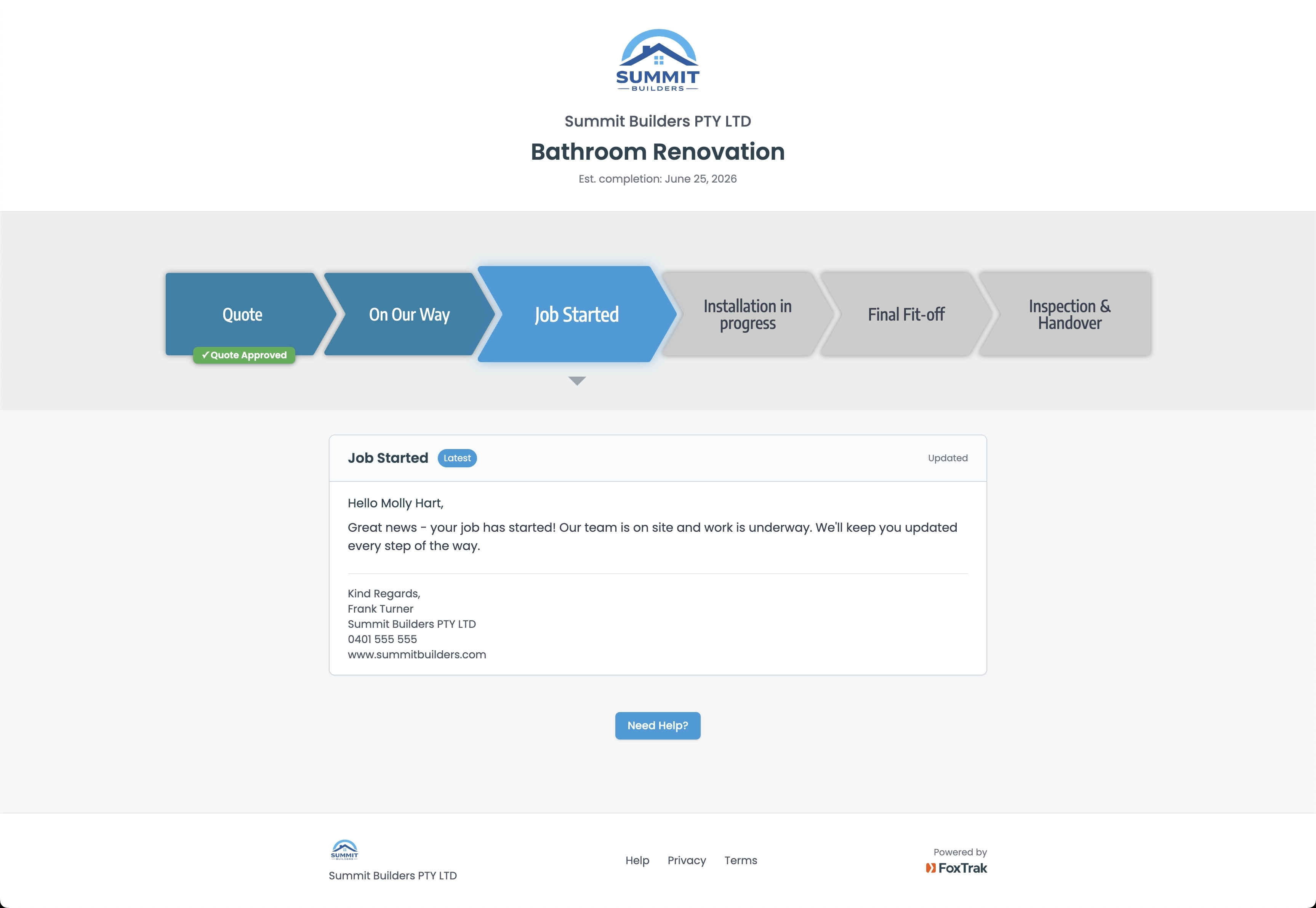
FoxTrak gives every job a live tracking page, branded to your business, updated in seconds, visible to your customer from first contact to final handover.
FoxTrak is customer communication and job tracking software built for trade businesses.
Every tradie knows it. The job is running fine. The work is good. But the customer hasn’t heard anything so they start calling.
“Just checking in, any update on when you’ll be done?”
It’s not that they don’t trust you. It’s that they have no visibility. They’re waiting on you and they don’t know what’s happening.
Most trade businesses manage this the same way, a text here, a call there, chasing their own tail between jobs. It works until it doesn’t. And when you’re flat out on site, it really doesn’t.
There’s a simpler way. Give them somewhere to look and they stop asking.
When you create a job in FoxTrak, your customer gets a live tracking link, no app download, no account needed. Just a clean branded page showing exactly where their job is up to.
Build your workflow once
Set up your steps the way you actually work. Quote, On Our Way, Job Started, Work in Progress, Final Inspection, Handover. Name them however you like. Takes minutes. Every job after that is ready in seconds.
Share a live link with your customer
They get a branded tracking page on any device, no login required. They can see exactly where their job is at any time without calling you.
Update a step. They’re notified instantly.
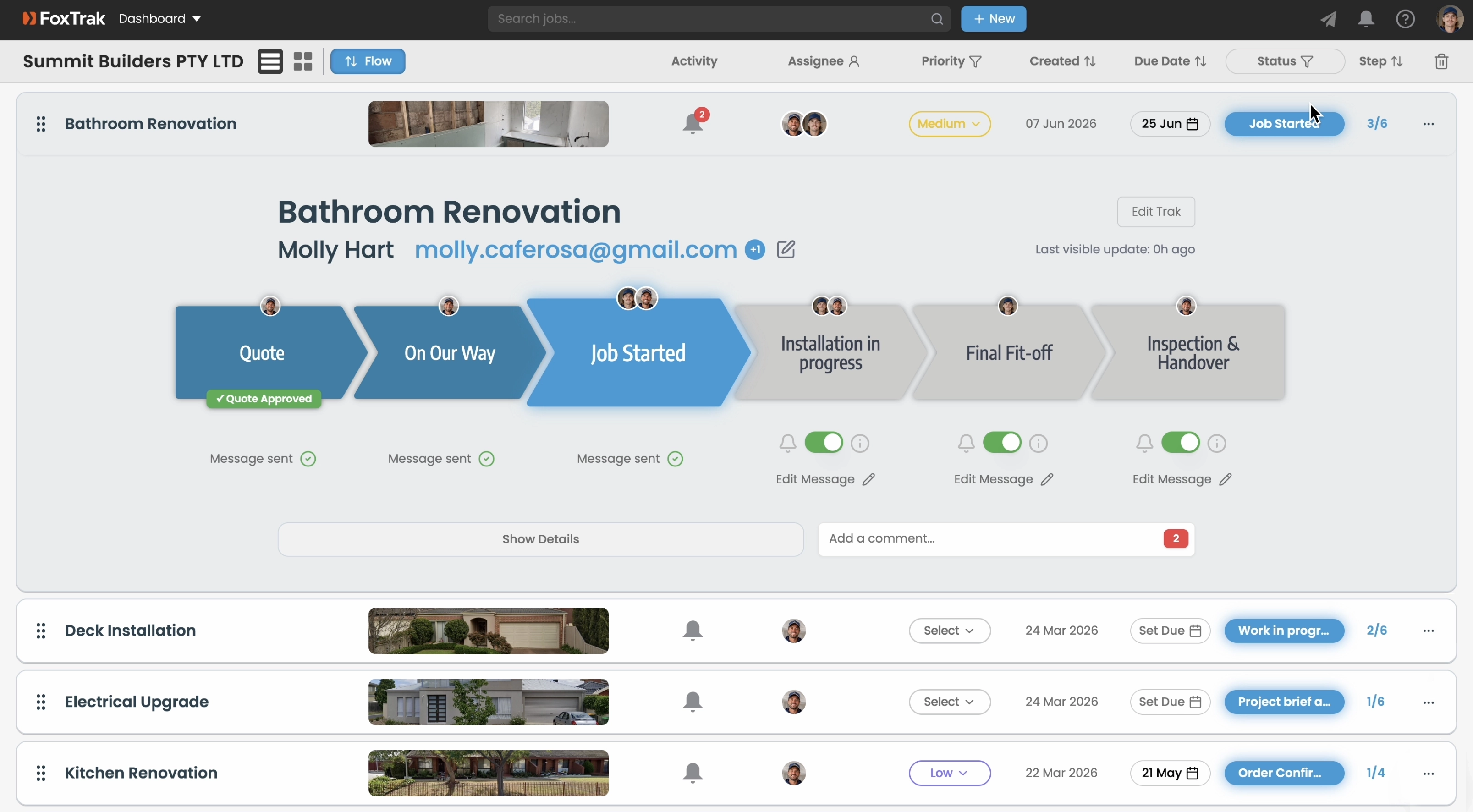
Mark a step on site in seconds. FoxTrak notifies your customer automatically by SMS or email. Attach a photo of the work. They see it straight away.
Example tradie workflow
Branded to your business
Your logo, your colours, your business name on every tracker. The same business they booked is the one they see updates from at every step, no generic app branding in between.
On-site updates in seconds
Mark a step from your phone while you’re on the tools. Your customer is notified instantly. No separate message needed.
Quote and invoice approvals
Send a quote or invoice directly from the tracker. Your customer approves or pays right there. You’re notified the moment they do.
Photo updates
Attach a before photo, a progress shot, a finished result. Your customer sees the work you’re doing. That’s how trust is built.
Team and assignee management
Assign jobs to team members. They’re notified when it’s their turn. Everyone knows what’s happening without the group chat chaos.
Xero integration
Quotes and invoices sync with Xero automatically. Your customer approves in the tracker, Xero updates. Less admin, more time on the tools.
Due date change alerts
Jobs run long sometimes, weather, materials, a bigger job ahead of you running over. Update the finish date and FoxTrak prompts you to tell the customer why before the tracker reflects it. Add a note or skip it, the date updates regardless.
Automatic reminders
A quote sitting unapproved or an invoice sitting unpaid doesn’t need a phone call from you. FoxTrak follows up automatically on a schedule you set, until the customer acts.
Every job, every customer, every team member. See what’s active, what’s overdue, and what needs your attention, all from one dashboard.
Customers check their tracker instead of calling you on site. Every update you send from your phone is one less interruption while you’re on the tools.
A live tracking page sets you apart from every other tradie who sends a text and goes quiet. Customers notice. That’s what wins repeat business and referrals.
Calm customers who feel informed pay faster. Invoice attached at the final step, paid without leaving the tracker. Less chasing, more cash flow.
Trade businesses across Australia are using FoxTrak to keep customers informed and cut down the status calls. When your customer can see the job moving, they trust the process. That’s the experience that gets you referrals.
Start for freeFrequently asked questions
Do I need to call or text customers every time something changes on a job?
No. Mark a step from your phone on site and the customer is notified automatically. The call you’d normally make is replaced by an update that happens the moment you do the work.
If I’m out on a different job, can my team still keep customers updated?
Yes. Assign steps to specific team members and they’re notified the moment it’s their turn to act, customer updates don’t depend on you personally being available.
What happens if a job runs longer than planned?
Update the finish date and FoxTrak prompts you to tell the customer why before it changes on their tracker, rather than them just noticing a later date with no explanation.
Free to start. Set up your workflow in minutes. Your customer gets a live tracking link the moment you create the job.
Start for freeFree plan available. No time limit.