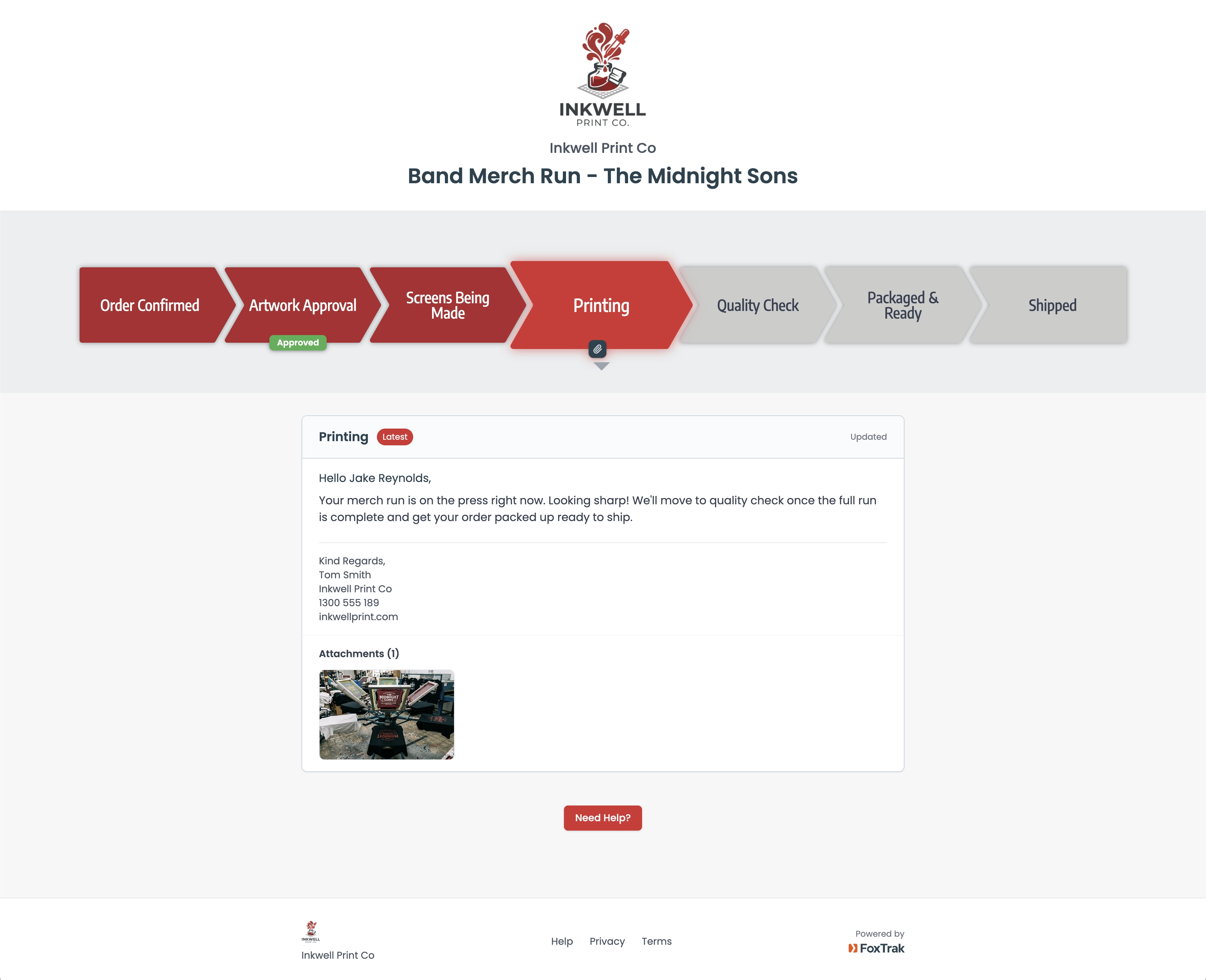
FoxTrak gives every print order a live tracking page, branded to your business, updated as each stage completes, visible to your customer from artwork approval to delivery.
FoxTrak is customer communication and order tracking software built for screen printing businesses.
Screen printing isn’t instant. There’s artwork to approve, screens to make, a press run to complete, quality checks, packing, shipping. Every stage takes time and skill.
But your customer just sees silence.
They placed the order. They paid the deposit. Now they’re checking their inbox every day wondering what’s happening.
“Is the artwork approved yet?”
“Has it gone to print?”
“Will it be ready before the event?”
Those calls and emails don’t mean they don’t trust you. They just have no visibility into a process they’ve never seen. Give them a window into your shop and the questions stop.
When you create a job in FoxTrak, your customer gets a live tracking link, branded to your business, no app download needed, works on any device.
Build your print workflow once
Set up your stages the way your shop actually runs. Order Confirmed, Artwork Approval, Screens Being Made, Printing, Quality Check, Packaged and Ready, Shipped. Name them your way. Every order after that is ready in seconds.
Share a live link when the order is confirmed
Your customer gets a branded tracking page showing every stage of their order. They can check it any time without calling you.
Update as each stage completes. They’re notified instantly.
Mark a stage done when screens are ready, when printing starts, when the order is packed. Your customer gets notified automatically by SMS or email. Attach a photo of the finished print. They see it before it ships.
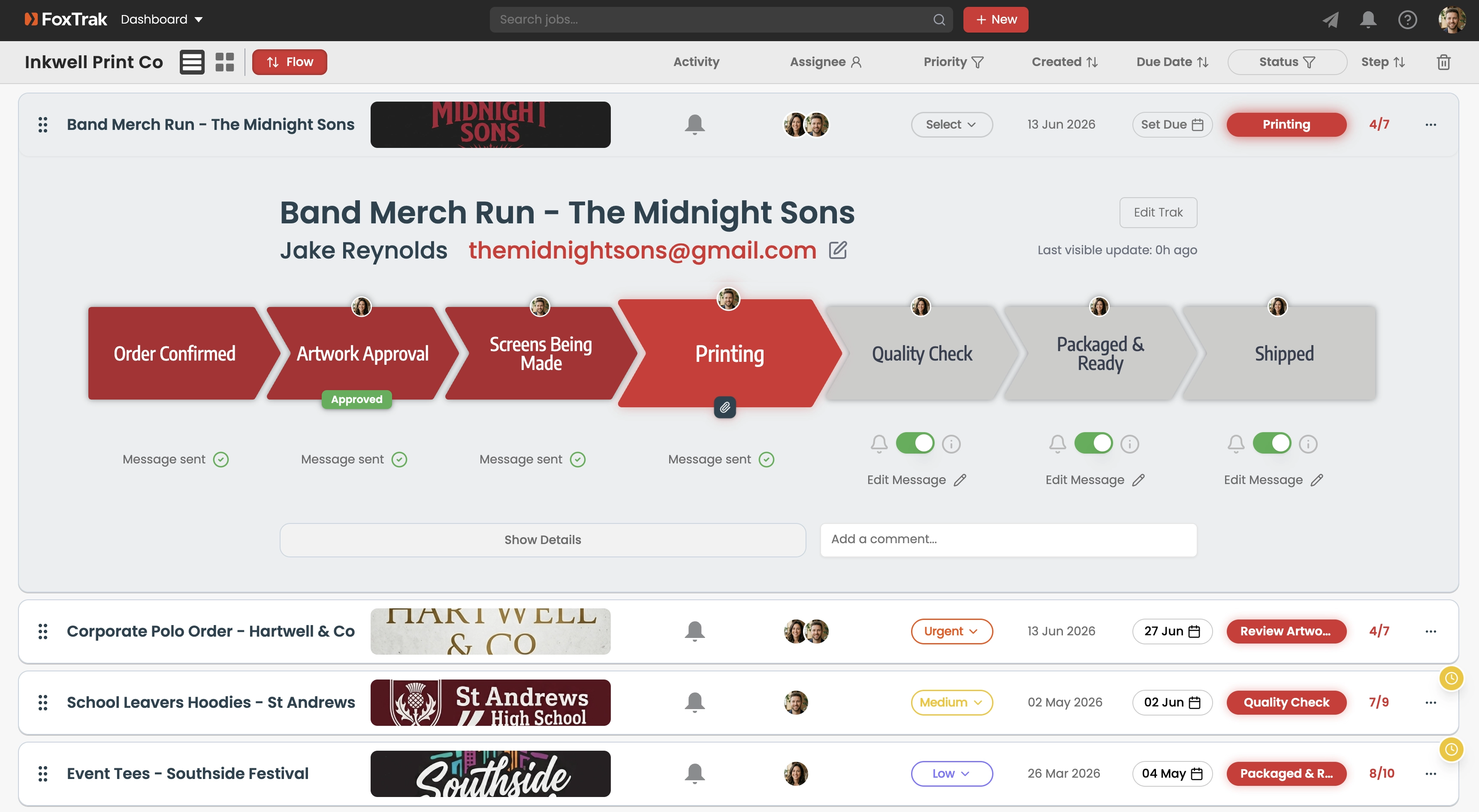
Example screen printer workflow
Branded to your business
Your logo, your colours, your business name on every tracker. Customers see a real print shop running their order, not a reseller or middleman passing it along.
Artwork approval built in
Send artwork for approval directly from the tracker. Your customer approves with one tap. No back and forth over email. No printing the wrong version.
Photo updates at every stage
Attach a photo of the screens, the press run, the finished product. Your customer sees the craftsmanship going into their order before it even ships.
Deadline visibility
Set a due date on every order. Your customer can see it on their tracker. No more panicked calls the week before an event asking if it’ll be ready in time.
Payment on completion
Invoice attached when the order is packed. Your customer pays right there without leaving the tracker. Calm customers pay faster.
Works for every order type
Merch runs, corporate uniforms, school leavers, event tees, promotional products. Build a workflow for each order type. Save it as a template. Every new job is ready in seconds.
Due date change alerts
A reprint, a supplier delay, screens needing remaking. Update the completion date and FoxTrak prompts you to tell the customer why before it changes on their tracker. Skip the note if you’d rather not, the date updates either way.
Automatic reminders
Artwork sitting unapproved holds up the whole job. FoxTrak follows up automatically on a schedule you set, so screens don’t sit waiting on a decision nobody chased.
See all your active print jobs at a glance, which orders are waiting on artwork approval, what’s on the press, what’s ready to ship. Run your whole shop from one screen.
Customers check their tracker instead of calling the shop. Every stage update you send is one less interruption while your team is running the press.
Artwork approval built into the tracker means customers sign off before screens are made. One tap approval, on the record. No costly reprints, no disputes.
Customers who feel informed and looked after place repeat orders. A smooth, visible process from order to delivery is what turns a one-off job into a long term account.
Print businesses are using FoxTrak to keep customers informed from order confirmation to delivery. When a customer can see their screens are being made, their job is on the press, their order is packed and ready, the calls stop. What replaces them is confidence. That’s the reputation that keeps customers coming back order after order.
Start for freeFrequently asked questions
How do customers approve artwork before it goes to print?
Send the artwork for approval directly from the tracker. The customer approves with one tap, on the record, so there’s no ambiguity about which version was signed off before screens are made.
Can customers see when their order is actually on the press?
Yes. Move the job to “Printing” and their tracker updates instantly. Attach a photo of the run and they see the work happening before it ships.
What if a reprint or supplier delay pushes the deadline?
Update the completion date and FoxTrak prompts you to explain why, so a customer with an event deadline hears the reason rather than just a later date.
Free to start. Set up your print workflow in minutes. Your customer gets a live tracking link the moment you confirm their order.
Start for freeFree plan available. No time limit.