Why updating your customer shouldn’t be extra work
TL;DR
In FoxTrak, marking a job step complete is the update, for the job, the team, and the customer, all at once. There’s no separate message to write, no second system to keep in sync, nothing extra left over once the work is done. One tap, three outcomes, because it’s all the same record.
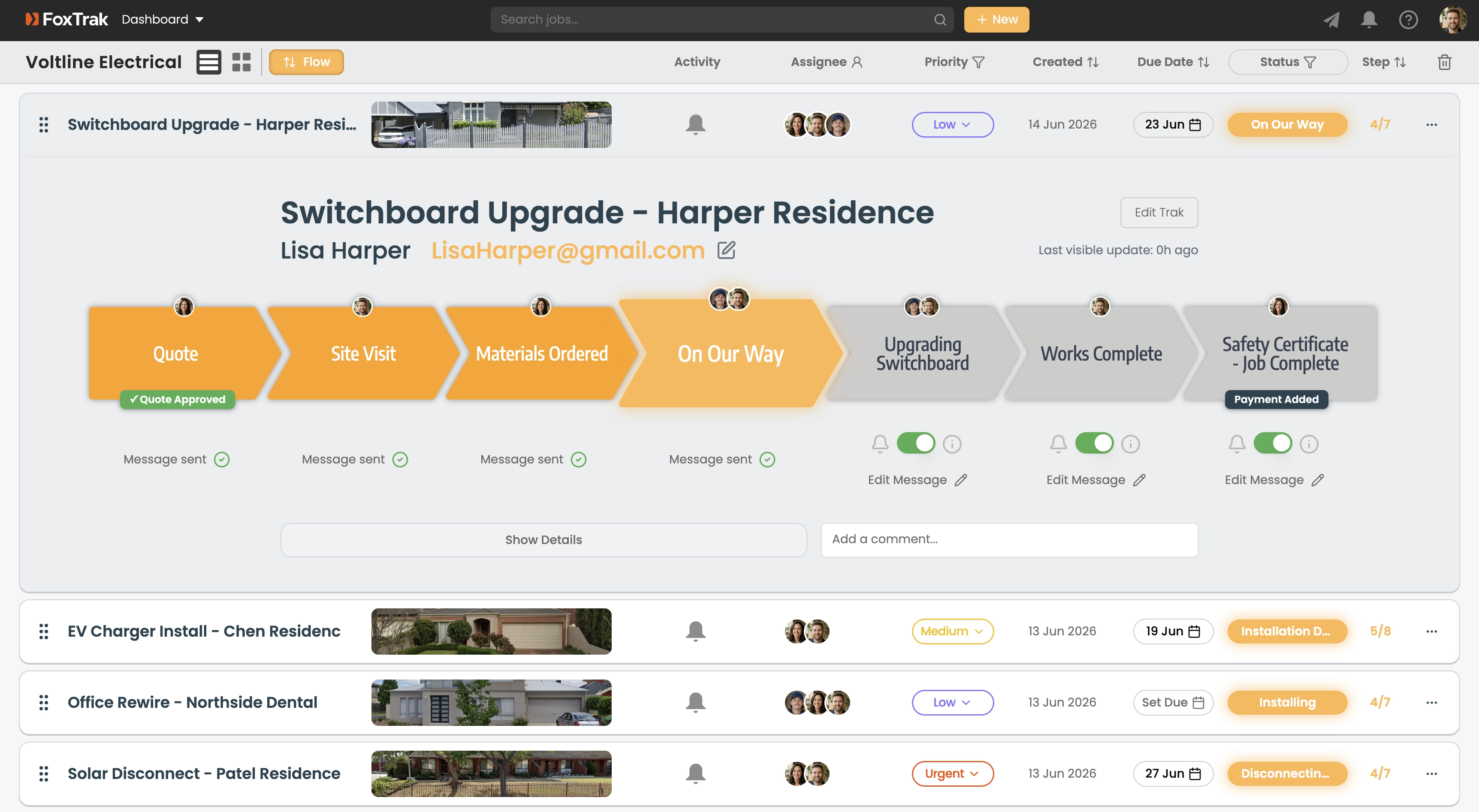
Most businesses treat finishing a step and updating the customer as two separate jobs.
First there’s the actual work: the install, the shoot, the fitting, the build. Then, once that’s done, there’s a second task waiting underneath it: someone has to remember to tell the customer. A text. An email. A call if it’s urgent enough. That second task doesn’t get scheduled anywhere. It just has to be remembered, usually by whoever’s busiest.
So it gets delayed. Or forgotten entirely, until the customer asks.
The hidden cost of double handling
Picture a Tuesday afternoon on a job site. The work for the day wraps up earlier than expected, ahead of schedule even. Good news, the kind of thing a customer would want to hear straight away. But the next job’s already waiting, the van’s loaded, and “message the client” slides down the list behind everything actually in front of you.
By the time anyone remembers, it’s evening. Or the next morning. Or the customer’s already called to ask what’s happening, at which point the good news arrives a day late and slightly defensive, more “sorry, forgot to tell you” than the win it should have been.
None of that is anyone being careless. It’s just what happens when telling the customer is a second task riding on top of the first one, with nothing forcing it to happen.
The work is the update
In most job tools, updating the job and updating the customer are two separate actions. In FoxTrak, they’re the same action, for everyone who needs to know.
One tap - job updated, team notified, customer informed.
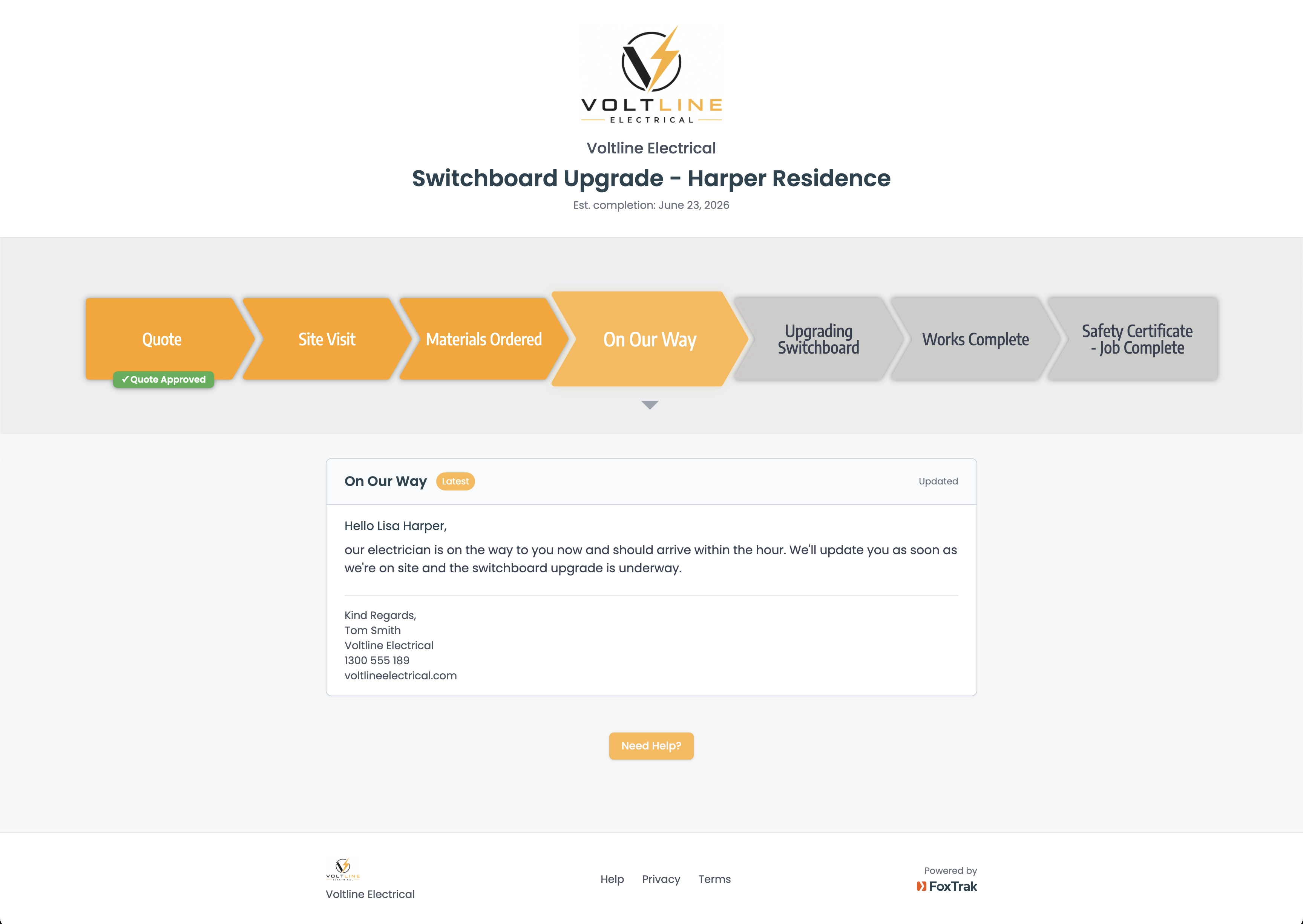
When a step is marked done, the customer’s live tracker updates immediately and they’re notified by email, SMS, or push, whichever they’ve chosen. If that step is assigned to someone on your team, that’s the same moment they’re told it’s their turn to act. Nobody’s checking in to ask what’s next. They’re told the instant it becomes their job to do something.
One action. Three outcomes. Not three things to remember.
The customer’s tracker is always in sync, because it’s not a copy
Here’s the part that makes this work without becoming fragile: it isn’t three separate systems quietly updating each other in the background. There’s one job record. What you see on your dashboard, what your team sees on their assigned steps, and what your customer sees on their tracker - aside from anything you’ve marked hidden and kept internal - is the same record, just shown to each person filtered for what they’re meant to see.
That’s also why the customer’s tracker isn’t just a single ping - it shows the whole job, what’s done, what’s now, what’s coming - because they’re looking at the real thing, not a summary of it.
That’s why there’s nothing to keep in sync, and nothing that can drift out of sync. You’re not updating a customer-facing copy of the job separately from the real one. There’s only one version of the job, and everyone’s looking at it.
What this looks like day to day
Whether you’re a plumber, electrician, landscaper, photographer, or builder, the job moves through its stages the way it always would - quote, deposit, work begins, milestones along the way, completion. The only change is what happens the instant a step gets marked. Instead of that update sitting invisible inside a dashboard until someone remembers to mention it, it goes out the moment it happens, to everyone who needs it.
Why this matters more than the time saved
The obvious win here is time - not stopping to write a separate message for every update. But the more important shift is consistency. When updates depend on someone remembering to send them, some get sent, some get delayed, some get missed entirely, especially on busy days, which are exactly the days everyone most needs to hear something.
When the update is the work itself, none of that depends on memory. The job, the team, and the customer are all looking at the same truth, updated the moment it changes, every time, without anyone having to be good at remembering.
Getting started
FoxTrak is free to start, no time limit on the free plan. Build your job steps once. From then on, every time you mark one complete, your team and your customer already know.
Frequently asked questions
Do I need to write a separate message to update my customer?
No. Marking a step complete updates the customer automatically. You can add a custom note or photo if you want to, but it’s optional, not required for the update to go out.
Does my team get notified too?
Yes. If a step is assigned to someone, they’re notified the moment it’s their turn to act, the same moment the customer is updated.
Is the customer seeing the exact same job record I am?
Yes, aside from any steps you’ve marked hidden and kept internal. Everything else is the same record, just shown from their side of it.
Can I hide internal steps from the customer?
Yes. Steps like internal checks or admin tasks can be marked hidden, so they update your dashboard without ever appearing on the customer’s tracker.