The difference between a client portal and FoxTrak
TL;DR
Most client portals are a copy of the job, built for the business first and shown to the customer afterward, behind a login. FoxTrak’s tracker isn’t a copy of anything. It’s the job itself, the same record the business is working from, with no account or password standing between the customer and it.
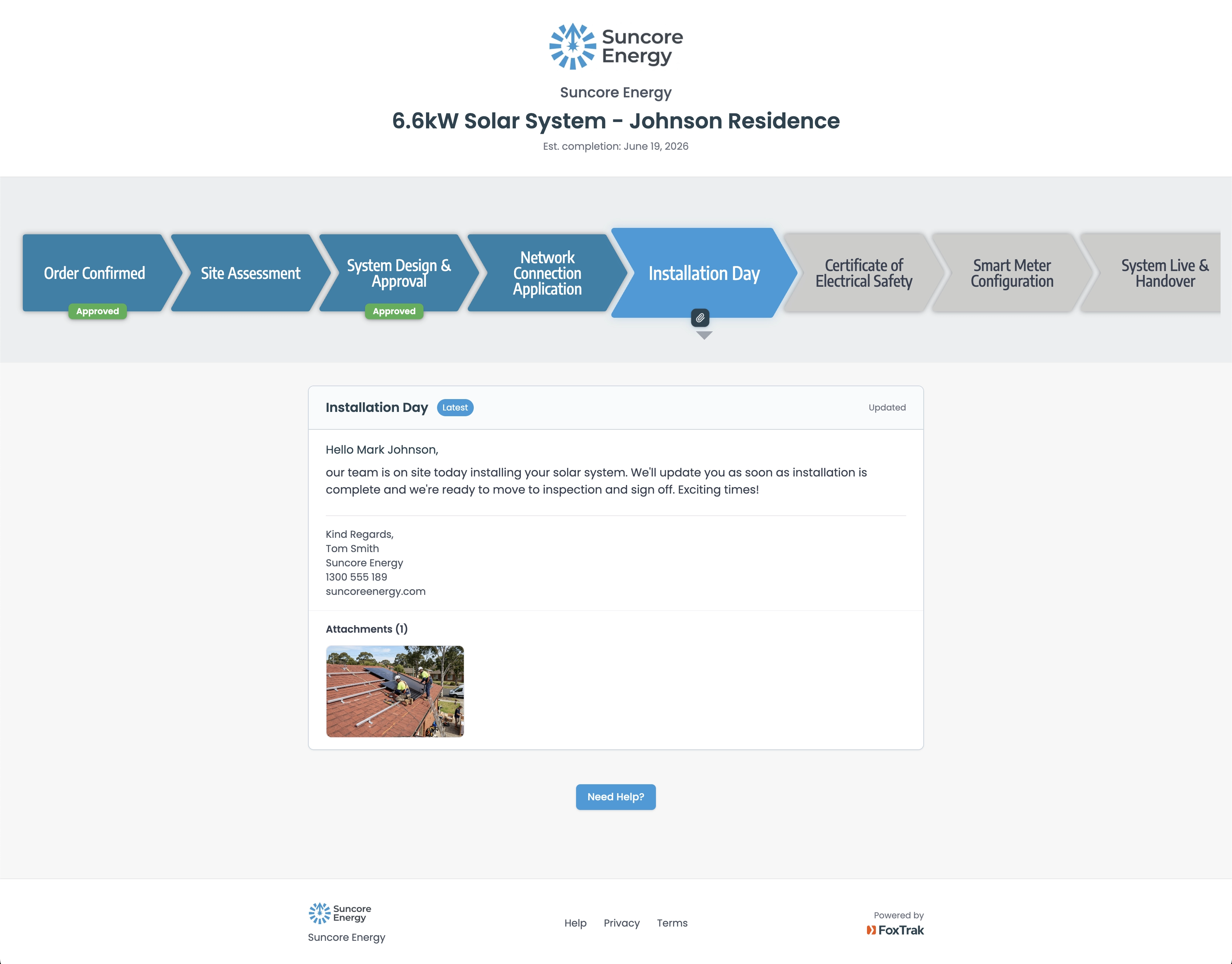
“Client portal” and “live tracker” get used like they mean the same thing. They don’t.
A portal is usually business software with a customer-facing window added to it afterward. The job lives in one system. A separate, customer-visible version gets built on top, often locked behind a login, so customers can check in without calling the business directly.
FoxTrak isn’t built that way. There’s no separate customer-facing copy of the job to build, lock behind a login, or keep updated. The tracker a customer sees is the same record the business is working from. The business doesn’t publish updates to customers. Updating the job and updating the customer are the same action. That’s not a smaller version of the same idea, it’s a different one entirely.
What a portal actually is, underneath the login screen
Most portals exist because the real job lives somewhere customers can’t see, an internal system, a spreadsheet, a tradie’s memory of what happened on site. So a second, customer-facing version gets created to show progress without exposing the internal system itself.
In many cases, work happens in one place while customer-facing updates happen somewhere else, a portal, a status field, a spreadsheet, a note someone means to publish later. It’s the same double handling that creates delayed or forgotten updates everywhere else, just with an extra login screen sitting in front of it.
Why FoxTrak doesn’t have that problem to begin with
FoxTrak’s customer tracker isn’t a second version of the job built to be shown. It’s the same record the business marks progress on, the same one a team member sees when a step gets assigned to them, just filtered to what the customer’s meant to see. When a step is marked done, that’s the update, for everyone, at once. There’s nothing separate to expose, so there’s nothing to lock behind a login in the first place.
That’s why there’s no account for a customer to create and no password to set. Not because FoxTrak removed a login screen from an otherwise normal portal, but because there was never a second system underneath one to log into.
It also means the customer isn’t seeing a one-line status pulled from somewhere else. They’re looking at the real job, what’s done, what’s happening now, what’s still coming, because that’s what the record actually contains.
What this means day to day
A customer’s link opens straight into the tracker, every time, on any device. There’s no account to lose access to, no password to reset, no support ticket generated because someone forgot a login they only needed three times across one job. The business isn’t maintaining a customer-facing system alongside the real one either, there’s only one system, full stop.
Why this is worth caring about beyond convenience
A portal with a login removed would still be a copy of the job someone has to remember to update. The update might go out a little easier, but it can still lag behind, still drift from what’s actually happening on site. FoxTrak’s tracker can’t drift, because it isn’t a separate thing being kept in sync. It’s the thing itself.
That difference is what actually protects trust over a long job. Not a friendlier login experience, but a tracker that’s never stale because there was never a second version of the truth for it to fall behind.
Getting started
FoxTrak is free to start, no time limit on the free plan. There’s no portal to set up, no customer accounts to manage, and no second system running alongside the real job. Create your first job, send the link, and that link is the entire system.
Frequently asked questions
What’s the difference between a client portal and FoxTrak?
A client portal is usually a separate, customer-facing copy of the job, built for the business and shown to customers afterward, often behind a login. FoxTrak’s tracker isn’t a copy. It’s the same job record the business and team are working from, filtered to what the customer’s meant to see.
Is FoxTrak a type of client portal?
Not in the way the term is usually used. Portals are typically built as an extra layer on top of the real job. FoxTrak’s customer tracker is the job itself, not a layer added on top of it.
Does the customer need an account or password?
No. Because the tracker isn’t a separate system, there’s nothing to create an account for. The customer opens a link and the tracker is right there.
Is it safe for the tracker to be accessible without a login?
Yes. Each tracker link contains a long, unique identifier that can’t be guessed or generated, the same access model used by shipping trackers and shared document links. The link itself is what grants access, so there’s no separate password to manage, but the link isn’t something a stranger could stumble onto or work out.
Can the business keep some details private from the customer?
Yes. Steps like internal checks or admin notes can be marked hidden, so they update the business’s view without ever appearing on the customer’s tracker. The customer sees a real, current view of their job, not the entire internal record.
Why does it matter that the tracker is the same record, not a copy?
A copy can fall behind if someone forgets to update it. A shared record can’t drift out of date the way a copy can, because there’s only one version of the job for everyone to see.